
Making flyers with AI works best when you treat the prompt as a short creative brief. Give the AI your real details, review the first result, and then continue the conversation until the message and layout are clear.
The Vismuse workflow
Go from a first draft to a clearer flyer in one chat
You do not need to open a canvas or rearrange layers. Ask the agent to revise the result in plain language.
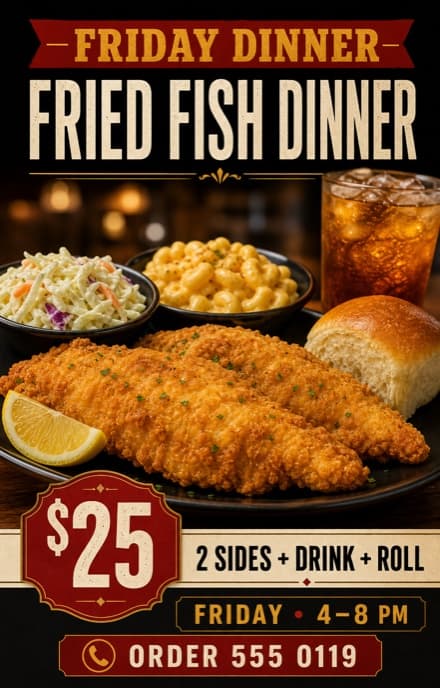
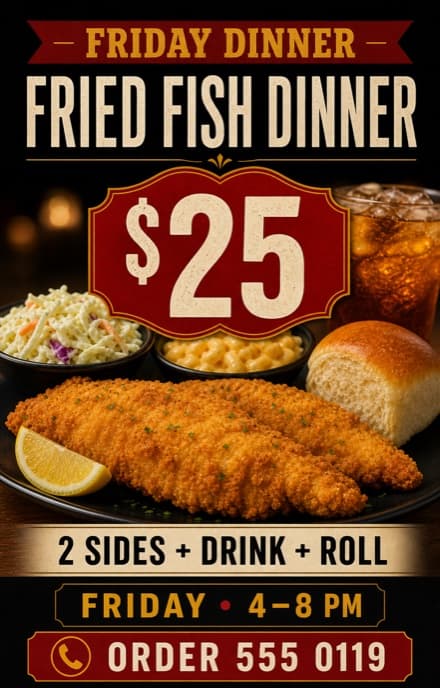
Example follow-up: “Make $25 the focus, simplify the layout, and make the phone number easier to scan.” The business details shown here are fictional.
Set the direction
Choose one goal and define your audience
Start with the job the flyer needs to do. Is it announcing an event, promoting an offer, advertising a service, or sharing a local update? Then name the audience and one action you want them to take.
“Promote Friday dinner orders to nearby families” gives the design a clearer priority than “make a restaurant flyer.”
Prepare the content
Gather your exact copy, photos, and logo
Put required wording in quotation marks and order the information by importance. Do not ask the AI to invent dates, prices, claims, addresses, or contact details.
Using a logo or photo? Upload it with the brief, explain its role, and state what must remain recognizable. Use only assets you own or have permission to publish.
Plan the placement
Choose where the flyer will appear and pick a format
Decide where the flyer will appear before you generate it. A printed handout, square social post, 4:5 feed image, and 9:16 Story need different spacing and text scale.
If the same campaign needs several formats, create a separate version for each one. Ask the agent to rebalance the layout rather than simply crop the first design.
Create the brief
Write a short flyer prompt
A useful prompt combines the communication goal, exact copy, visual hierarchy, main image, style, call to action, and format. A few focused sentences are enough.
Need a starting point? Browse the 25 AI flyer prompts and replace every placeholder with your real details.
Check the result
Generate and review the first draft
Review the message before the styling. The first draft does not need to be perfect; it needs to show you what to preserve and what to change.
Can someone identify the event, offer, or service in a few seconds?
Are names, dates, prices, addresses, and contact details correct?
Does the headline lead, with supporting information clearly secondary?
Is there one obvious next step, such as RSVP, order, book, or visit?
Keep the conversation going
Revise the flyer in chat
Continue in the same chat. Say what already works, identify the element to change, and describe the desired outcome. Focused requests make it easier to judge each revision.
Keep the current image and colors. Make “$25” the first thing people see, then simplify the supporting details.
Replace “Friday, 6–9 PM” with “Friday, 4–8 PM” exactly. Keep everything else unchanged.
Keep the headline, price, meal photo, hours, and phone number. Remove extra decoration and create more space between each information level.
Make a 9:16 Story version. Preserve the approved copy and visual direction, then rebalance the layout for the taller shape instead of cropping it.
How chat editing works: each request creates a revised image rather than exposing independent text boxes or layers. Proofread every version, and identify an earlier result by a visible detail if you want to return to it.
Finish carefully
Export and check the final file
Read every line one final time and check the image at its real viewing size. Download the final flyer as a PNG or JPG; eligible original results can also be exported as PDF.
For print, confirm exact dimensions, resolution, color, bleed, crop marks, and file format with the printer. A Vismuse PDF preserves the generated aspect ratio but does not automatically add bleed or crop marks.
Avoid these problems
Common AI flyer mistakes
Before you publish
Final flyer checklist
- The flyer has one clear purpose and audience
- The headline or offer is the first read
- Every name, date, price, address, and contact detail is correct
- The call to action is specific and easy to find
- Uploaded images and logos are authorized for use
- The format matches the intended placement
- Text is readable at the final viewing size
- Print dimensions and production requirements are confirmed
Frequently asked questions
How to make a flyer with AI: FAQ
How do I make a flyer online if I have never designed one?
Start with one message and one action for the reader. Gather your headline, offer or event details, and contact information, then use an AI flyer maker to create the layout from that brief. Review the text at phone size before sharing, and use a template when you need help choosing a visual direction.
Can I create a flyer for free?
Vismuse offers a limited free trial with watermarked downloads. You can try a flyer idea before paying. An eligible one-time purchase unlocks the current flyer in HD without a watermark, while an active subscription covers downloads of your images. Check the available option before exporting the final flyer.
How do I create a flyer with AI?
Describe what you are promoting, who the flyer is for, the exact details it must show, the desired visual direction, and the final format. Generate a first draft, review the hierarchy and copy, then request focused changes in the same chat.
What information should I include when making a flyer?
Include a short headline, the essential event or offer details, one call to action, and the contact or location information needed to act. Add an approved logo or photo when it helps people recognize the business, product, person, or event.
Can I edit an AI flyer after it is generated?
Yes. In Vismuse, continue in the same conversation and describe the outcome you want, such as correcting a date, making the price larger, simplifying the layout, or changing the background. Each request generates a revised result rather than exposing separate canvas layers.
Do I need a design editor to make a flyer with Vismuse?
No. You provide the brief and request changes through chat. You do not need to select text boxes, manage layers, or rebuild the layout on a traditional design canvas.
Can I upload my own logo or photo?
Yes. Upload the asset and explain whether it should be the main image, a supporting photo, a logo, or a style reference. State what must remain recognizable, and use only material you own or have permission to publish.
Can I make a flyer for print?
You can request a print-oriented shape and export eligible results as PNG, JPG, or PDF. The PDF preserves the generated image’s aspect ratio and does not automatically add bleed or crop marks, so confirm exact dimensions, resolution, color, bleed, and file requirements with your printer.
What size should an AI flyer be?
Choose the size for its destination before generating. Square and 4:5 work well for many feed placements, while 9:16 suits Stories. For print, name the intended paper or handout use and confirm the final production specifications with the printer.
Keep exploring
Related flyer resources
From brief to finished flyer
Create and revise your flyer with the AI agent
Describe the campaign, generate a first draft, and ask for changes in chat.