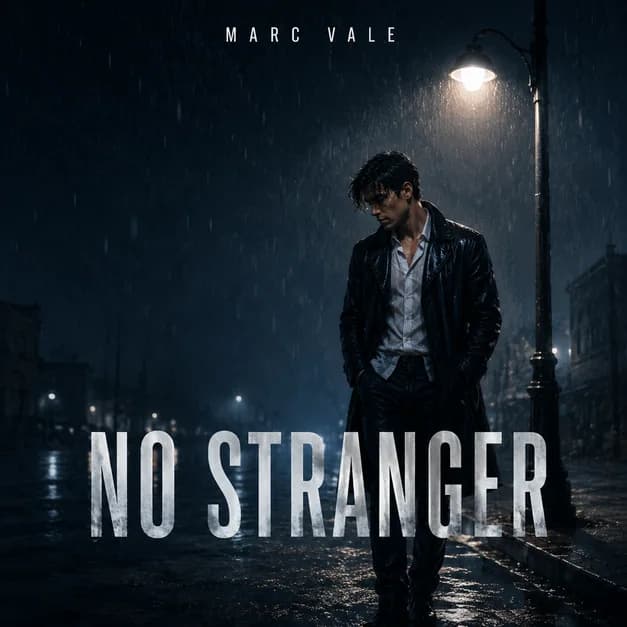
These album cover prompt examples are organized by subject, genre, and visual style, so you can scan for the closest direction before copying.
New to creating cover art? The AI album cover generator explains how to turn a brief into artwork and prepare a download. For a prompt-first workflow, use the AI album cover generator from text or photos to describe your release and refine the result in chat.
Found a direction? Copy a prompt, add your title or photo, and continue refining the cover in chat. Create your cover Pick faster
Which prompt should you start with? If your release feels… Start with Personal or identity-led 01–05: artist portrait and photo covers Dark, urban, or luxurious 06–10: rap and mixtape covers Intimate, romantic, or timeless 11–15: R&B, soul, jazz, and Latin covers Polished, bright, or futuristic 16–20: pop, electronic, and dance covers Raw, analog, or story-driven 21–25: rock, indie, punk, and country covers Symbolic, illustrated, or playful 26–30: conceptual and experimental covers
Create a square cinematic single cover from my uploaded portrait. Keep the face, hairstyle, expression, clothing, and three-quarter pose recognizable. Replace the background with a rainy city street, blue-gray shadows, warm streetlight reflections, and subtle film grain. Add the exact artist name “[ARTIST NAME]” at the top and title “[TITLE]” across the lower third.
Turn my photo into a square dark pop album cover. Preserve the person, face, pose, and clothing. Use a charcoal textured background, soft amber and blue rim light, faint cloud double exposure, and generous negative space. Add “[ARTIST NAME]” small at the top and “[TITLE]” in elegant type near the bottom.
Create a square luxury R&B cover from my portrait. Keep the face, expression, jewelry, and head angle unchanged. Place the artist against black satin with warm gold rim light and a polished editorial finish. Add the exact artist name “[ARTIST NAME]” at the top and album title “[TITLE]” in refined serif type at the bottom.
Turn my band photo into square release artwork. Keep every member recognizable and preserve their left-to-right order, clothing, and instruments. Replace the setting with a rehearsal room lit by direct flash, colored poster textures, and energetic shadows. Add the exact band name “[ARTIST NAME]” at the top and single title “[TITLE]” at the bottom.
Create a square alternative album cover from my side-profile portrait. Preserve the face outline, hair, and pose. Blend a distant mountain road and moving clouds inside the silhouette, using muted navy, silver, and pale gold. Keep the composition minimal. Add “[ARTIST NAME]” small above and “[TITLE]” in clean condensed type below.
Only request an advisory label when it accurately applies to the release.
Create a square gritty rap mixtape cover. Show a fictional artist silhouette on a rainy city block with wet asphalt, distant headlights, smoke, and a black, silver, and deep red palette. Use cinematic contrast and bold chrome typography. Add “[ARTIST NAME]” small at the top and “[TITLE]” large across the lower third.
Create a square black-and-white rap single cover with a lone fictional figure in a city alley, money bills moving through the air like snow, hard-flash photography, crisp grain, and subtle silver highlights. Keep the layout editorial and uncluttered. Add exact text “[ARTIST NAME]” at the top and “[TITLE]” at the bottom.
Create a square rap cover with “[NUMBER]” as the focal point. Place a fictional night skyline behind it, split by red light and deep shadow, with glossy streets, faint dice motifs, and cinematic haze. Add “[ARTIST NAME]” above the number and “[TITLE]” at the bottom. Make every word readable as a small thumbnail.
Create a square trap single cover with a fictional artist beside a black luxury car under amber streetlights. Use rain reflections, restrained jewelry details, deep shadows, and a black, bronze, and cream palette. Keep the mood expensive but minimal. Add “[ARTIST NAME]” at the top and “[TITLE]” in bold type at the lower right.
Create a square rap album cover with a cracked marble portrait statue, mirrored sunglasses, a red spotlight halo, black-and-white texture, and premium editorial spacing. Add “[ARTIST NAME]” small at the top, “[TITLE]” large across the center, and a small lower-corner label reading “ADVISORY.” Do not use real logos or artist likenesses.
Create a square heartbreak R&B single cover with two fictional people standing close but looking away from each other, blurred heart-shaped lights, a deep burgundy and gold palette, and soft cinematic shadows. Leave clean title space. Add “[ARTIST NAME]” small at the top and “[TITLE]” in soft serif type near the bottom.
Create a square neo-soul album cover with a fictional singer in a dim studio, warm amber spotlight, vintage microphone silhouette, velvet curtain texture, and soft film grain. Use deep green, copper, and cream with an intimate mood. Add “[ARTIST NAME]” above and “[TITLE]” in elegant type across the lower third.
Create a square vintage jazz cover with an abstract saxophone silhouette, smoky blue club light, cream paper texture, geometric shapes, and one restrained red accent. Make it feel like a collectible mid-century record sleeve. Add “[ARTIST NAME]” at the top and “[TITLE]” in modernist type at the lower right.
Create a square minimal R&B cover with a single silver microphone resting on dark satin, one wilted white rose, soft gold edge light, deep black negative space, and a quiet late-night mood. Add “[ARTIST NAME]” in small uppercase type and “[TITLE]” in a refined serif. Keep both readable at thumbnail size.
Create a square reggaeton single cover with a fictional artist on a tropical rooftop after sunset, warm city lights, humid haze, palm silhouettes, and glossy coral, violet, and midnight-blue color. Use confident fashion photography and clean title spacing. Add “[ARTIST NAME]” at the top and “[TITLE]” bold at the bottom.
Create a square premium pop group cover with five fictional performers in coordinated black, white, and silver outfits, chrome reflections, softbox lighting, and confident editorial poses. Keep the composition clean and fashion-led. Add group name “[ARTIST NAME]” at the bottom and album title “[TITLE]” in bold type at the top.
Create a square electronic single cover with a luminous sky above a futuristic city edge, glowing cloud portals, soft laser streaks, reflective chrome forms, and a blue, violet, and sunrise-orange palette. Keep the center open and modern. Add “[ARTIST NAME]” small at the top and “[TITLE]” wide across the center.
Create a square dance single cover with one abstract ribbon of electric light twisting through a dark club space, subtle fog, cyan and magenta reflections, and sharp black negative space. Avoid people and logos. Add exact text “[ARTIST NAME]” at the top and “[TITLE]” in clean geometric type at the bottom.
Create a square synthwave EP cover with a chrome sphere above a reflective grid, a deep violet sunset, thin laser lines, and subtle analog grain. Balance retro-futurist atmosphere with a clean streaming-ready layout. Add “[ARTIST NAME]” small above the sphere and “[TITLE]” in wide uppercase type below.
Create a square bedroom-pop single cover with a fictional singer sitting beside an open window at blue hour, sheer curtains moving, scattered star-shaped lights, soft lavender and peach tones, and intimate 35mm texture. Add “[ARTIST NAME]” at the top and “[TITLE]” in small handwritten-style type near the bottom.
Create a square cinematic indie album cover with a lone fictional figure beside a foggy coastal road at sunrise, muted sage, cream, and dusty blue, soft 35mm grain, and understated negative space. Add “[ARTIST NAME]” small at the top and “[TITLE]” in elegant serif type near the lower third.
Create a square pop-punk single cover with a fictional four-person band in a garage rehearsal space, direct-flash photography, pink and electric-blue posters, guitar amps, sticker-like accents, and playful rough edges. Add band name “[ARTIST NAME]” at the top and title “[TITLE]” in hand-drawn type at the bottom.
Create a square metal album cover with a monumental black stone gate in a stormy mountain landscape, red lightning behind dense clouds, ash moving through the air, intricate engraved texture, and no people. Add “[ARTIST NAME]” small at the top and “[TITLE]” in sharp silver type across the bottom.
Create a square country single cover with a warm sunset over an open road, dry grass, an acoustic guitar case, and a weathered pickup in the distance. Use soft film grain and an earthy red, cream, and faded-denim palette. Add “[ARTIST NAME]” at the top and “[TITLE]” in rustic serif type below.
Create a square grunge rock cover from torn black-and-white photocopies, scratched film frames, handwritten marks, one acid-yellow accent, and an off-center empty silhouette. Keep the collage raw but readable. Add “[ARTIST NAME]” in small type at the top and “[TITLE]” stamped across the lower third.
Use this example for one original collage-style release cover. To arrange existing album covers in a grid, use a photo collage editor.
Create a square symbolic album cover with an open book floating over a dark reflective surface, its pages unfolding into a tiny sunrise landscape. Use soft dust particles and a navy, ivory, and gold palette. Add “[ARTIST NAME]” small at the top and “[TITLE]” in refined serif type near the bottom.
Create a square illustrated single cover with a fictional character in headphones holding a glowing planet inside a transparent bubble, colorful orbit lines, dreamy clouds, and a cyan, coral, yellow, and midnight-blue palette. Add “[ARTIST NAME]” at the top and “[TITLE]” in rounded type at the bottom.
Create a square trippy cartoon mixtape cover with a surreal house party built from abstract shapes, vinyl records, speakers, neon waves, and simple fictional mascot silhouettes. Use saturated teal, pink, orange, and violet. Add “[ARTIST NAME]” small at the top and “[TITLE]” in bubbly type at the center.
Create a square motivational rap cover set on a football field at night, with the one-yard line glowing under stadium lights, dramatic fog, scoreboard-inspired accents, and a black-and-gold palette. Do not use real teams or athletes. Add “[ARTIST NAME]” above and “[TITLE]” huge across the center.
Create a square gaming-inspired album cover with a fictional avatar silhouette on a neon court, original holographic stat panels, abstract badge icons, and a metallic purple, lime, and charcoal palette. Avoid copyrighted game interfaces. Add “[ARTIST NAME]” at the top and “[TITLE]” in bold type at the bottom.
After the first result
Keep editing the cover in chat Do not paste the entire original prompt again. Say what already works, then ask for one focused change.
Replace the current title with “[TITLE]” exactly. Keep the artwork, subject, colors, crop, artist name, and title placement unchanged.
Keep the same face, hairstyle, expression, clothing, and pose. Change only the background to [NEW BACKGROUND].
Create another version for the same release. Keep the artist, title, and mood, but use a clearly different composition with [NEW DIRECTION].
Remove the extra person behind the artist. Keep the main subject, face, pose, typography, lighting, and square layout.
Keep the concept and text. Simplify the background, increase subject contrast, and make the title easier to read at thumbnail size.
Return to the earlier version with [IDENTIFYING DETAIL], but keep the corrected title “[TITLE]” and the current color treatment.
Referring to an earlier version? Name the visible detail that identifies it. The agent may ask which result you mean if the reference is unclear.
Frequently asked questions
AI cover art prompt FAQ What should an AI cover art prompt include? Include the release type, main subject, scene, mood, lighting, color palette, exact artist and title text, and a 1:1 square format. Add what must stay unchanged when you use a reference photo.
How long should an album cover prompt be? Use enough detail to establish one clear direction. Two to five short sentences are usually easier to control than a long list of conflicting styles.
Can I use these prompts with my own photo? Yes. Upload the photo and state which face, pose, clothing, instrument, or group arrangement the agent should preserve before describing the new setting.
How do I fix incorrect text in AI cover art? Send the exact replacement in quotation marks and ask the agent to change only that text. Proofread every letter before publishing.
Do I need an editor after generating the cover? Not for ordinary revisions in Vismuse. Continue in the same chat to change the title, background, color, crop, or subject. A traditional editor is still useful for exact pixel-level adjustments.
Can I use AI cover art commercially? Check the current Vismuse plan terms and your distributor requirements. You are responsible for having permission to use uploaded photos, logos, fonts, and other reference material.
From prompt to finished cover
Create and revise your cover with the AI agent Choose a prompt, add your release details, and make every follow-up change in chat.
Start creating