Vismuse
AI Video GeneratorCreate short AI videos from prompts, references, and briefs.AI Flyer GeneratorTurn events, offers, and listings into flyers.AI Brochure GeneratorStructure company, product, and service content into brochures.AI Album Cover GeneratorDesign album covers, mixtape art, and single artwork.AI Image MakerCreate any image from a prompt, link, or reference.Product Ad GeneratorGenerate product promo images and ad creatives.AI Room DesignUpload a room photo and redesign interiors with AI.Background RemoverRemove backgrounds for clean cutouts and product images.Business Card MakerCreate print-ready front and back business card designs.AI Logo GeneratorCreate logo concepts, brand marks, badges, and monograms.Tattoo GeneratorCreate tattoo concepts, stencil ideas, flash art, and sleeve layouts.AI Poster MakerCreate posters for events, product promotions, movies, lost-and-found notices, and more.Invitation MakerCreate birthday invitations, party invites, and event cards.AI Book Cover GeneratorCreate ebook, Kindle, and paperback cover concepts.AI Sticker GeneratorCreate stickers, reactions, and sticker sheets.AI Wallpaper GeneratorGenerate phone and desktop wallpapers.
AI VideoToolsTemplatesResourcesPricing
DocsHow to make a birthday flyer with AI

How to make a birthday flyer with AI: a step-by-step guide

Create a birthday flyer for a children's party, Sweet 16, milestone celebration, or birthday bash, then refine the copy, photo, theme, and RSVP details in chat—no design editor required.

Create your flyer
Published September 5, 2026·6 min read·By Vismuse Team

On this page

Birthday flyer examples1. Write the invitation and RSVP details2. Choose a theme and approved photo3. Lead with the name, age, and RSVP4. Generate the birthday flyer and check the invitationCommon mistakesFinal checklistFAQ

A good birthday flyer sets the mood without making guests hunt for the essential details. The Vismuse AI birthday flyer generator turns those details into a complete first draft.

Ready to make a birthday flyer?Send the party details and an approved photo, then refine the result through chat.Create your flyer

For different celebrations

Birthday flyer examples

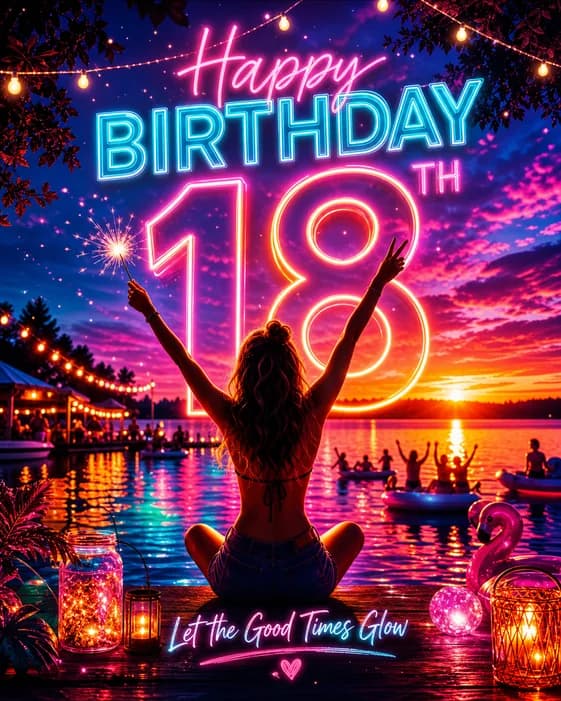
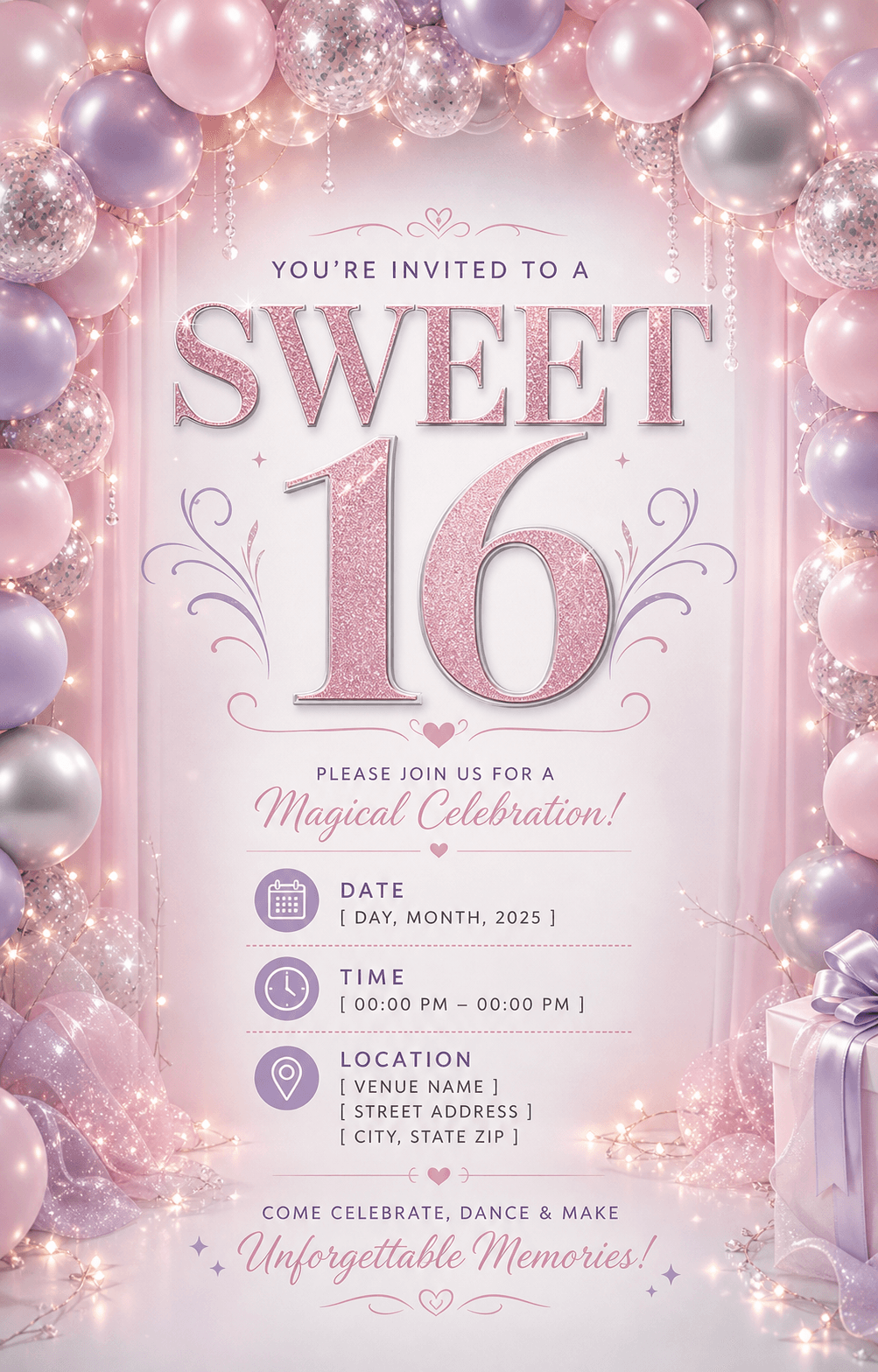
Children's parties, Sweet 16 celebrations, and milestone birthdays may use different styles, but the essential details should always remain clear.
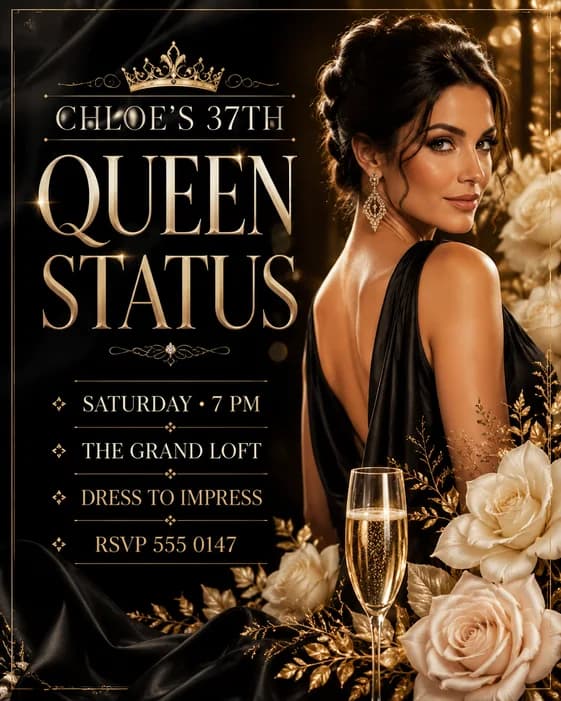
Luxury birthday party flyer with a portrait, celebration details, and RSVP information
Luxury birthday party
Pink Sweet 16 birthday flyer with date, time, location, and invitation details
Sweet 16 invitation
Neon 18th birthday poster with a large milestone age and celebratory party scene
Milestone birthday poster
1

Start with accurate information

Write the invitation and RSVP details

Start with a simple invitation: “JOIN US TO CELEBRATE [NAME] TURNING [AGE] · [DATE AND TIME] · [VENUE]. RSVP TO [CONTACT] BY [DEADLINE].” Omit the age if the host prefers, and add dress code or what-to-bring notes only when needed.

Choose the right RSVP contact. For a surprise party or children's event, that may be the organizer rather than the celebrant.

CelebrationCelebrant's name, age or milestone, and the type of birthday event.
Date and timeDay, date, start time, end time when needed, and time zone for online events.
VenueVenue name, street address, room, neighborhood, or online location.
RSVPContact method, response deadline, ticket link, or note for parents and guardians.
2

Set the celebration mood

Choose a theme and approved photo

Pick one direction that fits the event: playful for a children's party, polished for a milestone dinner, glam for a Sweet 16, or energetic for a birthday bash. A focused theme keeps the birthday flyer design coherent.

If you use a portrait, upload an approved photo and explain who it shows, how prominent it should be, and what must remain recognizable. Use only images you have permission to share.

3

Plan for where guests will see it

Lead with the name, age, and RSVP

Choose 4:5 or 1:1 for many social feeds, 9:16 for Stories, or a portrait format for a printed handout. Request a separate version for each important placement instead of forcing one layout everywhere.

Let the name and milestone lead, followed by the date and venue. Keep the RSVP block easy to find without competing with the main visual.

4

Generate the birthday flyer and check the invitation

Choose a prompt, replace the invitation details, and upload an approved portrait if wanted. State the name, age, theme, and RSVP wording exactly. Send the prompt in Vismuse to generate the first draft.

Children's birthday party prompt

Create a cheerful 4:5 birthday party flyer for “[NAME]” turning “[AGE].” Show “[DATE],” “[TIME],” “[VENUE],” “[ADDRESS],” and “[RSVP CONTACT AND DEADLINE]” exactly. Use my approved photo as the main image, keep the child recognizable, and build a playful [THEME] setting with [COLORS]. Make the name, age, and RSVP details easy to read.

Sweet 16 celebration prompt

Create an elegant Sweet 16 flyer for “[NAME].” Include “[DATE],” “[TIME],” “[VENUE],” “[ADDRESS],” “[DRESS CODE],” and “[RSVP CONTACT]” exactly. Use my approved portrait, preserve the person's appearance, and create a [GLAM / FLORAL / NEON] look in [COLORS]. Prioritize the name and “SWEET 16,” followed by the event details.

Milestone birthday prompt

Create a polished birthday flyer for “[NAME]'S [30TH / 40TH / 50TH] BIRTHDAY.” Show “[DATE],” “[TIME],” “[VENUE],” “[ADDRESS],” and “[RSVP OR TICKET LINK]” exactly. Use my approved photo and create a [STYLE] design with [COLORS]. Make the milestone age the visual focus while keeping the venue and RSVP easy to find.

Confirm the name, age, date, venue, and RSVP contact with the host. For a surprise party, do not list the celebrant as the contact; keep a private home address out of public posts if needed.

Ask for changes in the same chat. For example: “Keep the portrait and pink-and-gold theme. Make “[NAME] TURNS [AGE]” the headline and place “[RSVP CONTACT AND DEADLINE]” in a clear footer.”

Each revision creates a new image, so recheck details you did not ask to change.

Check the invitation on a phone and confirm the RSVP number. Download as PNG or JPG, or export an eligible original as PDF. For print, confirm sizing and resolution with your printer; PDF export does not automatically add bleed or crop marks.

New to Vismuse? Follow the step-by-step flyer creation guide. For changes to an existing design, see how to edit a flyer with AI.

Avoid these problems

Common birthday flyer mistakes

Leaving out the RSVP deadlineTell guests how and when to respond, especially when capacity, food, or tickets are involved.
Mixing too many themesChoose one visual direction instead of combining every color, character, and party motif.
Covering the face with textKeep important copy away from the eyes and other recognizable facial features.
Making the details too smallTest the date, venue, and RSVP block at the size guests will actually see.

Before you send it

Birthday flyer checklist

  • The celebrant's name and age or milestone are correct
  • The day, date, time, venue, and address have been verified
  • The RSVP method and deadline are easy to find
  • Dress code, ticket, gift, or entry notes are included only when needed
  • Uploaded photos are approved and the person remains recognizable
  • All text is readable in the intended format, and print requirements are confirmed when needed

Frequently asked questions

How to make a birthday flyer: FAQ

How do I make a birthday flyer with AI?

Gather the name, age, date, time, venue, RSVP details, theme, and an approved photo if you want to use one. Send them as a clear brief, review the first result, and request focused changes in the same Vismuse chat.

What should a birthday flyer include?

Include the celebrant's name, age or milestone, date, time, venue, address, and RSVP method. Add a response deadline, dress code, ticket link, gift note, or parent contact only when it helps guests prepare.

Can I use a photo on a birthday flyer?

Yes. Upload a photo you have permission to use, identify the person, and say what should remain recognizable. Check the generated result carefully before sharing it, especially when the photo shows a child.

What size should a birthday flyer be?

Use 4:5 or 1:1 for many social feeds, 9:16 for Stories, or a portrait format for printed handouts. Create a separate layout for each important placement so the party details remain readable.

Can I update an existing birthday flyer?

Yes. Upload the flyer or continue from a Vismuse result, quote the exact replacement text, and name what should stay. Each edit creates a revised image rather than changing independent layers, so review the entire result again.

Can I print a birthday flyer made with Vismuse?

You can download results as PNG or JPG, with PDF export available for supported original results. A Vismuse PDF preserves the generated aspect ratio and does not automatically add bleed or crop marks, so confirm the required dimensions, resolution, color, bleed, and file format with your printer.

Keep exploring

Related flyer resources

AI Flyer GeneratorSee how the chat-based flyer maker creates and revises birthday invitations without a traditional canvas.Create a birthday flyer in VismuseSend the party details and approved photo, review the first draft, and request focused changes in chat.25 AI flyer promptsCopy prompt patterns for birthdays, parties, events, businesses, restaurants, and other promotions.Edit a flyer with AICorrect a date, update the venue, replace a photo, or adapt a birthday flyer through chat.Flyer templatesBrowse visual directions for birthdays, parties, events, businesses, and local celebrations.Party Flyer GeneratorExplore a focused workflow for birthday parties, club nights, celebrations, and social events.How to make an event flyerPlan a broader public or ticketed event around verified details and one clear attendance action.How to make a flyer with AIRead the broader workflow for planning, generating, reviewing, and exporting any type of flyer.

From party details to finished invitation

Create and revise your birthday flyer with the AI agent

Send the exact copy and approved photo, then request changes in the same chat.

Start creating

A clear birthday flyer

Lead with the name and milestone, then make the party details easy to act on.Remember:
  • Name and age
  • Verified date and time
  • Clear venue details
  • Easy RSVP
Vismuse

Create and edit images and videos through conversation—no traditional editor required.

Product

AI Image GeneratorAI Video GeneratorAI Image to Video GeneratorAI Animation GeneratorAlbum Cover MakerProduct Ad MakerAI Flyer Maker

Templates

All TemplatesFlyer TemplatesAlbum Covers

Resources

Help CenterDocsToolsPricing

Company

Contact supportAbout VismuseAcceptable UsePrivacyTermsRefund PolicyCookies
© 2026 Vismuse. All rights reserved.
English
EnglishDeutschFrançaisEspañolPortuguês (Brasil)日本語한국어繁體中文